How to read novels on Shosetsuka ni Naro
Shosetsuka ni Naro, often called Syosetu or Narou, is a large Japanese novel-posting service. You can read without an account. An account adds bookmarks and reading history. This guide explains the labels that help an English-language reader find the correct work and resume a long serial.
Use the Japanese navigation, rankings, work search, completion labels, bookmarks, and episode pages without confusing a serial, short story, or published edition.
Use the main navigation
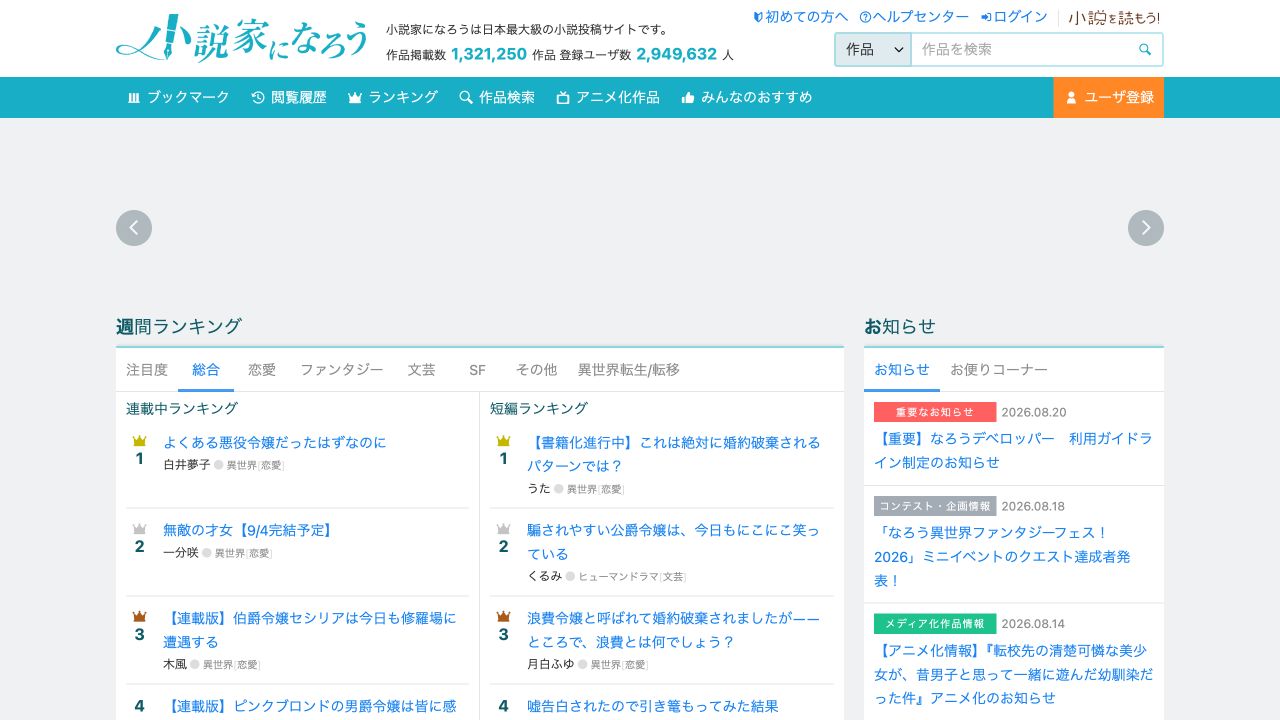
作品 means works. ユーザ means users. ブックマーク opens bookmarks, 閲覧履歴 opens reading history, ランキング opens rankings, and 作品検索 opens work search. アニメ化作品 lists works with anime adaptations.
Select 作品検索 when you know a title. Paste the Japanese title, then compare the author and synopsis. A romanized fan title can differ from the title stored on the site. If you know only an English title, first find the exact Japanese spelling through an official publisher or author page.
Use ランキング when you want to browse. The weekly ranking can be filtered by 総合 for overall, 恋愛 for romance, ファンタジー for fantasy, 文芸 for literature, SF for science fiction, その他 for other, and 異世界転生/転移 for other-world reincarnation or transfer.
Know which type of work you opened
連載中 means the serial is ongoing. 完結 means complete. 短編 identifies a short work. 全 followed by a number and エピソード gives the total episode count on many home-page cards.
Open the work page and read the synopsis, author, genre, keywords, update date, and status before episode one. Look for author notes about a revision, hiatus, print edition, or moved version. A print release can be edited and may not match the web text.
Save the work URL and the Japanese title. This gives you a reliable reference if search results later include adaptations or works with similar translated names.
Use the table of contents and episode page
A serial work page links each episode from its table of contents. Check the episode title and update date before you open it. When a work has volumes or arcs, keep those headings with your notes because episode numbers can restart or special chapters can sit between arcs.
The episode page has controls for the previous and next episode. Do not use the browser Back button as your only progress marker. For a long serial, bookmark the work and record the last completed episode number.
閲覧履歴 can help you return to recent pages, but a separate progress note is safer when you read on more than one device or clear browser data.
Translate Japanese web prose with context
Preserve ruby text, punctuation, paragraph breaks, blank-line scene separators, and episode headings. Japanese frequently omits the subject. Translate a complete exchange rather than one sentence at a time, and compare uncertain pronouns with the prior scene.
Create a glossary for names, honorifics, titles, locations, abilities, and repeated phrases. Record both the source spelling and the chosen English form. Keep the episode URL with the translation so you can verify a line later.
Read the complete English scene before you accept it. Check dialogue attribution, tense, names, numbers, and viewpoint. A fluent sentence can still assign an action to the wrong character.
Keep free access separate from permission to republish
A work that is free to read remains protected by its author’s rights. Do not repost the Japanese text or distribute a translated edition without permission. If a work has a licensed English release, use the licensed edition for public recommendations and support the official release.