How to read web novels on Naver Series
Naver Series separates web novels, comics, and ebooks. The novel home shows ranking, genre, collected-edition, Free Pass, timed-free, and Time Deal views. This guide explains the Korean labels that matter before you open or pay for an episode.
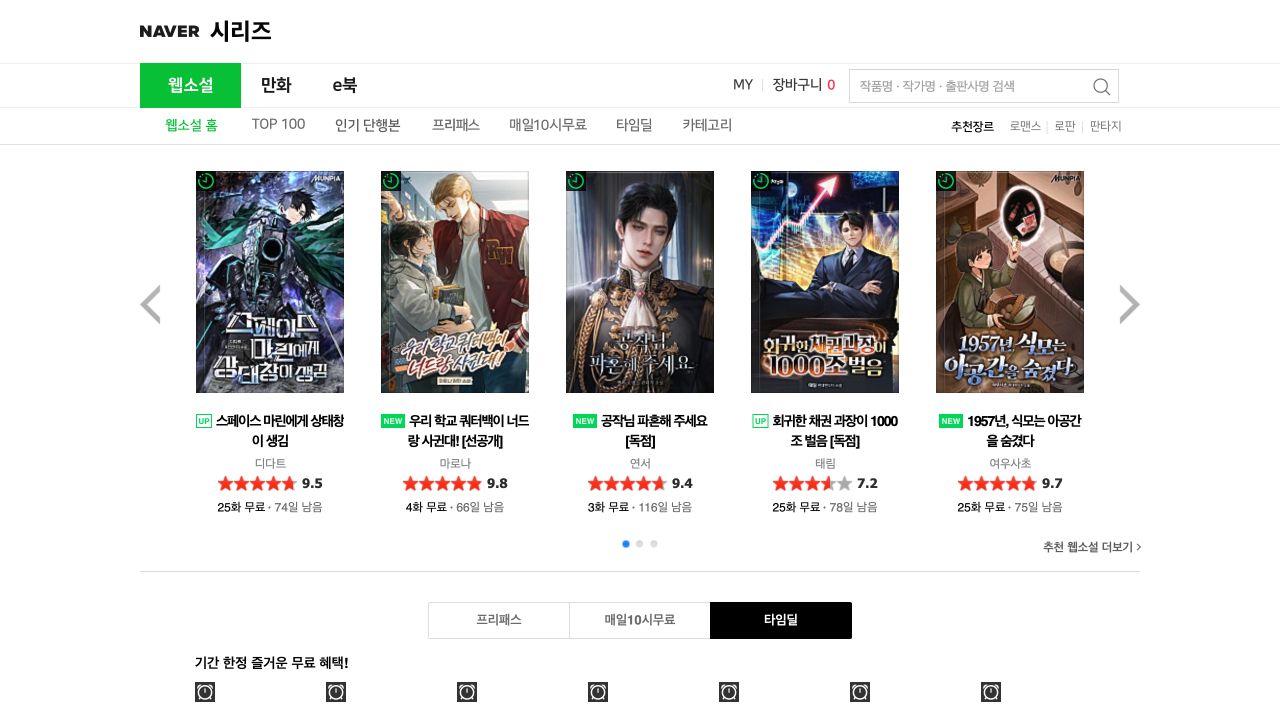
Use the Naver Series novel home, identify serial and collected editions, read free-episode labels, and avoid losing access to a timed offer.
Open the web novel home
Open series.naver.com/novel/home.series. The active service label is 웹소설, which means web novel. The local navigation includes 웹소설 홈 for the novel home, TOP 100, 인기 단행본 for popular collected books, 프리패스 for Free Pass, 매일10시무료 for one timed-free episode each day, 타임딜 for limited Time Deals, and 카테고리 for categories.
Use 로맨스 for romance, 로판 for romance fantasy, and 판타지 for fantasy. 만화 switches to comics and e북 switches to ebooks, so confirm that 웹소설 is still active before you select a result.
The search control says 검색. Search with the Korean title first. If several results share a title, repeat the search with the author name and compare the cover, work type, and description.
Read every offer label before you open the work
A result card can show a fixed free count and an end date. For example, 25화 무료 74일 남음 means 25 episodes are free with 74 days left in the offer. 오늘 마감 means the offer ends today. Do not treat the number of free episodes as permanent.
매일10시무료 is a timed unlock program. 타임딜 is a limited promotion. 광고보고무료 means access is available after watching an advertisement. 1권 무료 means the first collected volume is free. Each program can have different account, app, and access conditions.
Open the work and check the episode list before you pay. Confirm whether the item is an episode, a rental, or a collected volume. Read the final Naver checkout screen because the catalogue card is only a summary.
- 화 means episode.
- 권 means volume.
- 무료 means free.
- 남음 means remaining.
- 독점 means exclusive.
- 단행본 means a collected-book edition.
Use only the official reader and account flow
Naver Series can ask you to sign in, use Cookies, or continue in the Series app. Cookies are Naver’s purchase credit. Use the official Naver sign-in and the app-store link supplied by Naver. Do not install an application file from a forum or file-sharing site.
If access fails, check the account, region, age requirement, offer end date, and edition. A work can have both a serial and a collected-book page, and access bought on one page does not automatically describe the other.
Translate complete scenes and keep a glossary
Korean often omits a subject that English needs. A title can also replace a name for many chapters. Keep the previous scene and your glossary available while you read so that one uncertain line does not change who acted.
Keep the source title, author, work URL, episode number, and source paragraph order. Record names, titles, organizations, locations, skills, and system terms before you translate a large group of episodes.
Review names, titles, pronouns, numbers, and system messages first. Those details carry more story information than smooth phrasing. Keep a private translation private unless you have permission to distribute it.
Keep the source private unless you have permission
Pay for the source through its official channel and do not republish the text or a translated copy. Translation does not remove the copyright in the original work.