How to read web novels on KakaoPage
KakaoPage combines webtoons, web novels, books, and scheduled series. If you cannot read Korean, the site can look like one large catalogue. The important first step is to enter the web novel area and confirm that the work page says 웹소설 before you open or buy an episode.
This guide shows the current KakaoPage website from the web novel menu to the episode reader. It explains the Korean labels that identify novels, free episodes, work information, and reading controls.
Before you start
Use the official KakaoPage website or app. The desktop website works for browsing and for many episode pages, but account, payment, age-restricted, or app-only actions can change by country and by title. Do not install an unofficial KakaoPage application package.
Have the Korean title ready. If you found the novel through an English recommendation, also copy the Korean author name. English fan titles are not reliable search terms, and one story can have a web novel, webtoon, and collected-book edition.
- Official site: page.kakao.com
- Web novel in Korean: 웹소설
- Webtoon in Korean: 웹툰
- Book in Korean: 책 or 단행본
- Free in Korean: 무료
Open the web novel catalogue
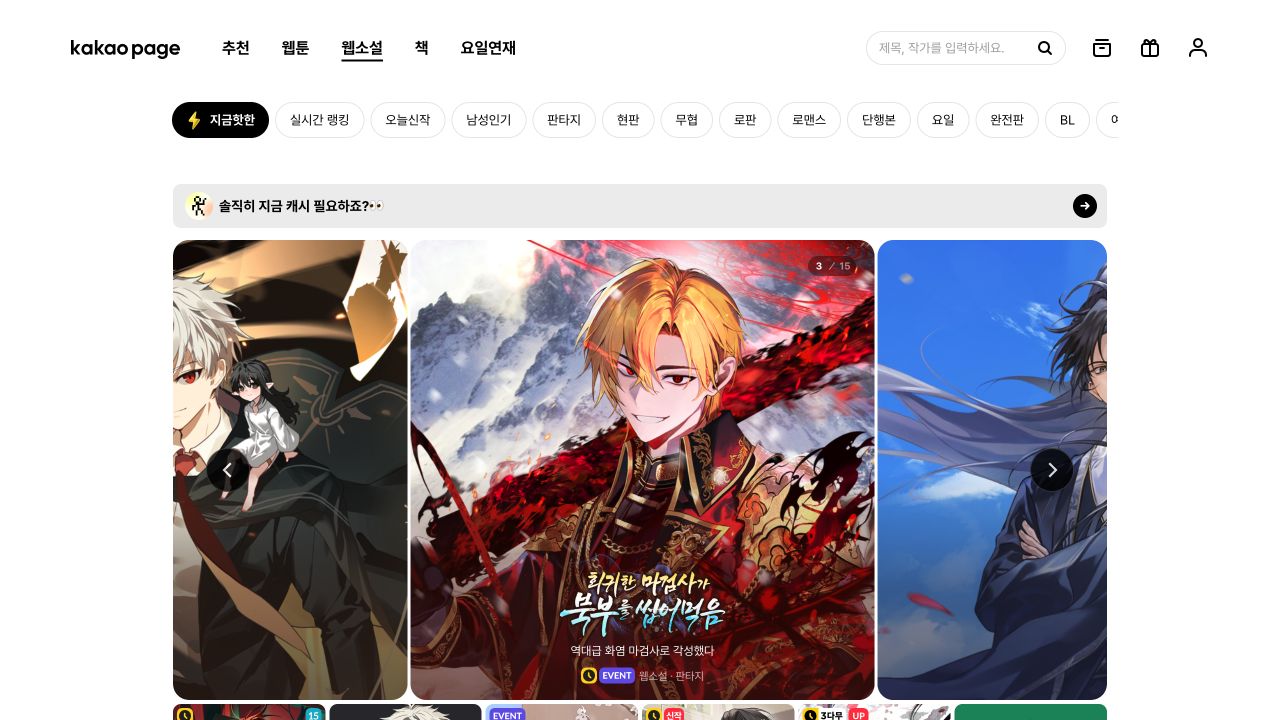
Open KakaoPage. In the top navigation, select 웹소설. On the current desktop site this is the third tab, after 추천, which means recommendations, and 웹툰, which means webtoon. The web novel catalogue URL is page.kakao.com/menu/10011/.
The second row contains catalogue views and genres. 지금핫한 shows currently popular works. 실시간 랭킹 is the live ranking. 오늘신작 shows new releases. The genre tabs include 판타지 for fantasy, 현판 for modern fantasy, 무협 for martial arts, 로판 for romance fantasy, 로맨스 for romance, and BL. 장르전체 opens all genres.
Use the search field at the upper right when you know a title or author. The placeholder says 제목, 작가를 입력하세요, which means “Enter a title or author.” Paste the Korean title without quotation marks. If the result is uncertain, repeat the search with the author name.
Confirm that you found the prose version
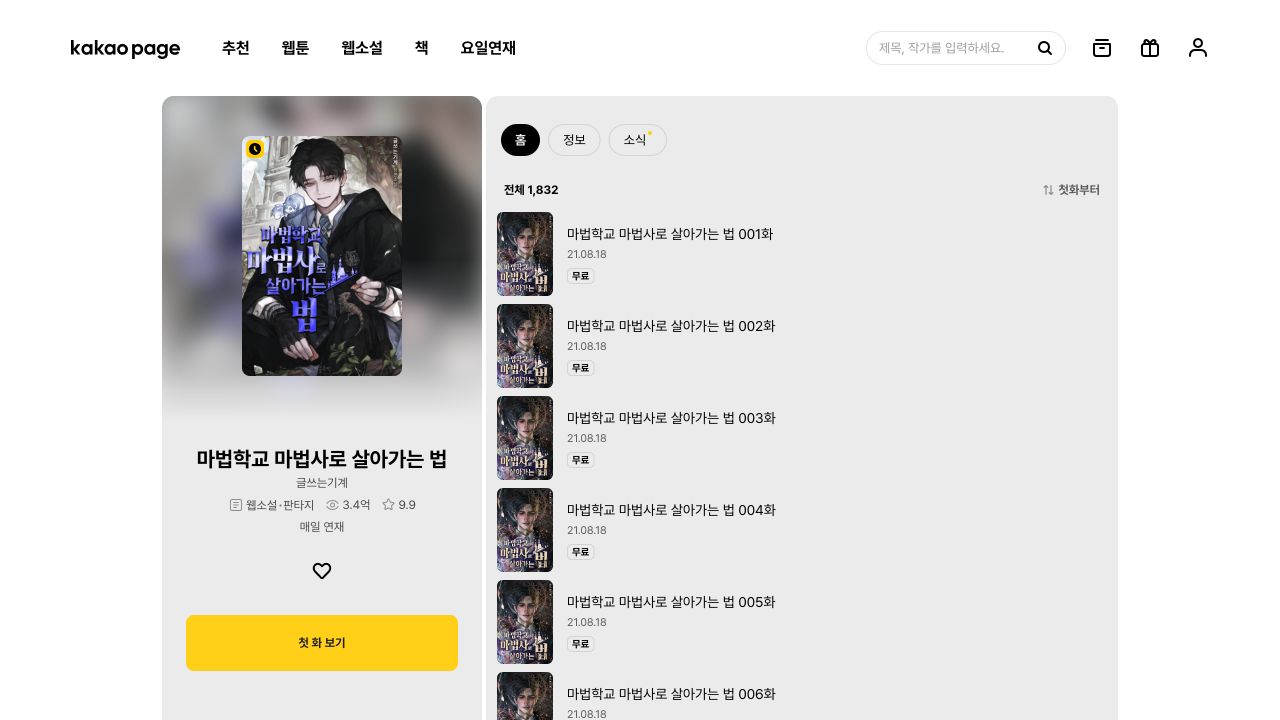
Open the result and read the metadata under the title. The tested work page for 마법학교 마법사로 살아가는 법 shows the author 글쓰는기계, the labels 웹소설 and 판타지, a reader count, a rating, and 매일 연재, which means it publishes every day.
The format label is the decisive check. 웹소설 identifies the serial prose work. 웹툰 identifies a comic. 단행본 identifies a collected book edition. A page can also link to 동일작, which means another edition or adaptation of the same work.
The work page has three tabs. 홈 is the main page and episode list. 정보 contains work information. 소식 contains notices. Read the information and notices before you buy a long series because the author can announce breaks, revised editions, or publication changes there.
Open the episode list and read the access label
Select 첫 화 보기, which means “Read the first episode.” In the tested work, this action expanded the list and showed 전체 1,832, meaning 1,832 total episodes. The sort control said 첫화부터, meaning “from the first episode.”
Each row shows the episode title, episode number, release date, and access state. The first six episodes in the tested work showed 무료. Select only an episode that is marked free or that you have lawfully unlocked. Later episodes can use tickets, cash, timed access, or another offer. Read the exact label and checkout screen because access terms can differ by title.
If an episode is unavailable, do not assume the site is broken. Confirm that you are signed in, that the offer is valid in your region, and that the work does not require age verification. Use only the official account and verification pages.
Use the reader controls
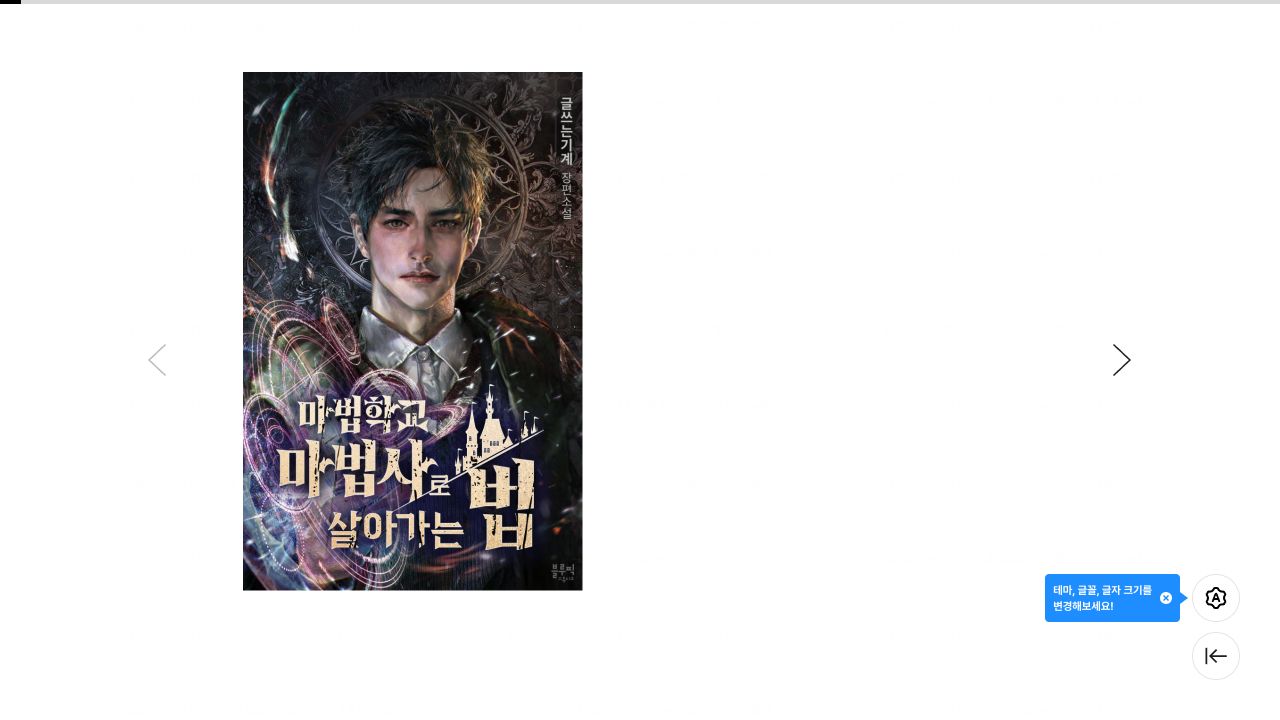
Select an episode row to open the reader. On the tested desktop reader, the chapter content occupied the centre of a wide white page. Left and right arrow controls moved between pages or sections. Controls at the lower right opened reading settings and returned to the episode list.
The blue helper message beside the settings button said that the theme, font, and text size can be changed. Open this control before you use browser zoom. A larger in-reader font usually gives better line wrapping than scaling the complete website.
The first visible page can be a cover or title image. Move forward before you decide that the chapter text failed to load. If the reader remains blank, reload once, disable page translation for the site, and test the same episode in the official app.
Translate the chapter for private reading
Do not use the browser’s full-page translation as your only copy. It can translate navigation, comments, and interface labels together with the story, and it does not keep names consistent across hundreds of episodes.
For a long Korean novel, record the source spelling and your chosen English spelling for every recurring name, title, organization, location, skill, and item. Add one short role note for each character. Korean can omit the subject, so a role note and the prior paragraph help prevent the wrong English pronoun.
Process one complete episode at a time. Preserve paragraph breaks and scene separators. Review dialogue attribution, names, titles, numbers, and system messages before you polish sentence style. When a fluent line changes who acted or what happened, compare it with the Korean source and the previous scene.
- Keep the Korean title, author, work URL, and episode number with your notes.
- Create the glossary before you translate many episodes.
- Keep the source and English text aligned by paragraph.
- Record corrections so later episodes use the same decision.
- Keep the translated copy private unless you have distribution rights.
Common problems
If search returns the comic, look for 웹소설 on the result card or work page. If the episode list looks empty, select 첫 화 보기 and wait for the list to load. If a free label disappears, check whether the offer ended or whether you opened a different edition.
If the site requests identity or age verification, follow only the official KakaoPage flow. Never send identity documents to a translator, seller, community moderator, or person who contacts you in a private message. If the official flow does not support your country, do not use false identity information.
KakaoPage can change its interface and access rules. The screenshots and tested steps in this guide are from 22 August 2026. Use the Korean labels as stable checks when the layout changes.