
In this guide
You do not need a perfect outline to begin. You need one decision: what should happen in the next scene?
Webnovels AI keeps your manuscript, story records, and chat with Bao in one project. You can write the prose yourself, ask for options, or request a change to a selected passage. This guide takes you through that process.
Connect a model, set up a book, make a chapter plan, and keep one useful edit. Stop there before you expand the whole novel.
1. Connect your AI account
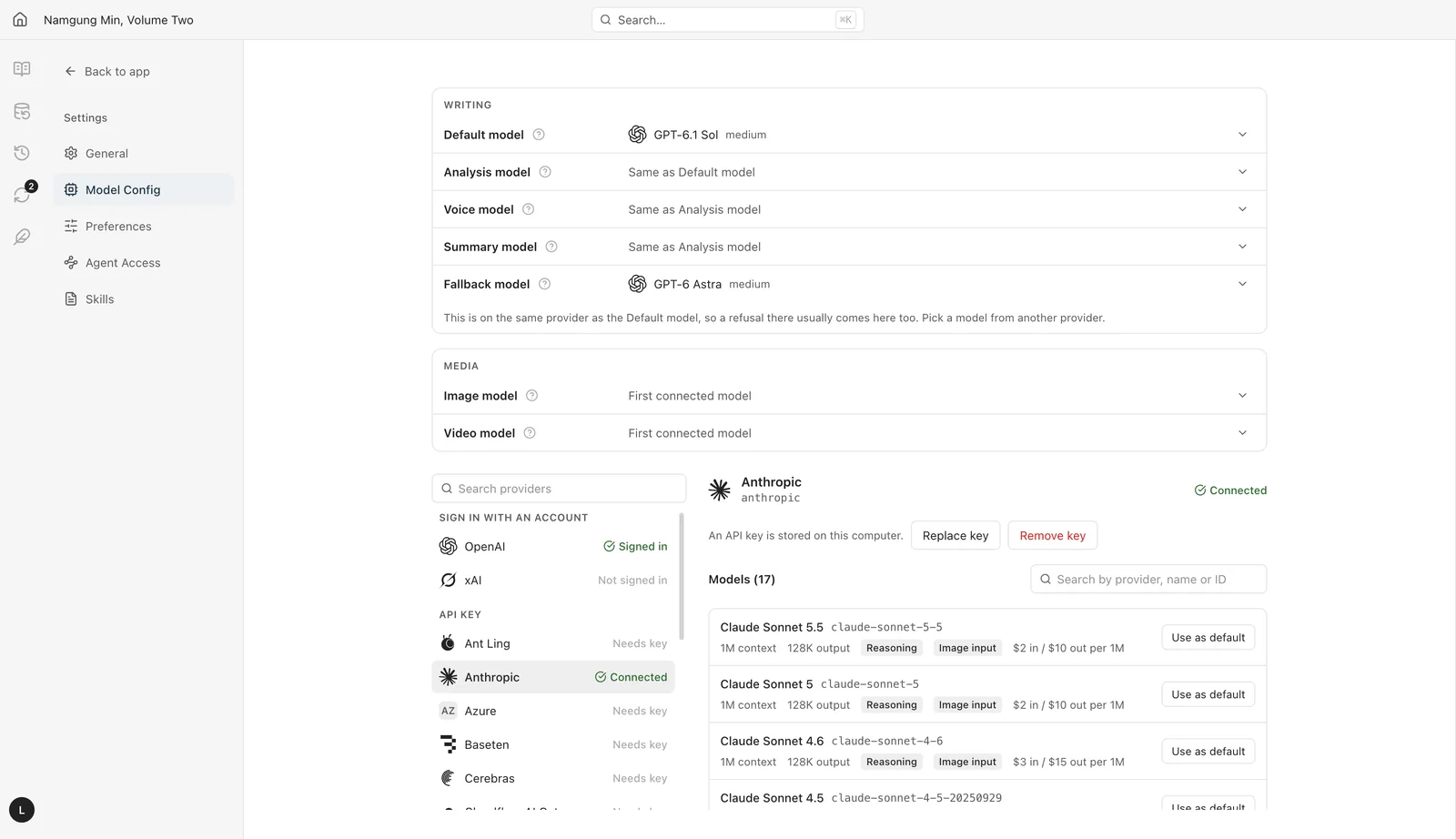
Bao needs a model connection to respond. You can use a supported account connection or bring your own API key. Start with one connection so you can test it before changing other settings.
- Open Settings in the desktop app, then open Model Config.
- Choose Sign in with ChatGPT or Sign in with SuperGrok or X Premium and complete the sign-in. For another provider, choose Use an API key instead and enter its key. For a local model, such as Ollama or LM Studio, choose Add custom provider.
- Choose the Default model from the models that account offers. The other writing slots show Same as Default model until you change them.
- Open a book’s chat and send a short request, such as “Summarize the premise in one sentence.”
Check the result: the connection shows as ready and Bao returns a response. If it fails, check the connection and model before you retry a long writing request. Account limits and API charges still apply.
Your project is stored on your computer. An AI request sends relevant project context to the provider you choose. Use source material that you own or have permission to use.
2. Start a book
On the Dashboard, choose New book. The dialog offers two starts. After you choose Open the book, the setup chat asks one question at a time. Answer the questions, review what Bao records, and correct a wrong assumption before you plan a chapter.
New book: start from your own idea
Choose New book, enter a working title, and set Written in to the language of the manuscript. In the setup chat, describe the premise, genre, narrative voice, lead character, and world rules. Keep each rule concrete.
Help me set up a new novel. Ask about my premise, genre, main character, narrative voice, and world rules, one question at a time. Use my answers to build the book’s foundation. Do not draft until I approve the direction.
Before you draft: open Book memory and check that the story card and character records match your decisions. Use /brainstorm if you need alternatives.
New-novel example: develop an idea in chat. The same setup can support different story traditions.
Existing book: build on a story you already have
Choose Existing book. Drop in the pages (TXT, Markdown, EPUB, or a ZIP of them), or choose Or build on a book already in this studio. Set Chapters to use and confirm that you are the author or have the legal right to use the files. Bao reads the source into Book memory before setup starts.
The app has no separate mode for each kind of follow-up book. Tell Bao in the setup chat what the new book is: what happens next, a sequel, a prequel, a side story, a rewrite, or a new story in the source’s voice. Copy the prompt that fits.
Continuation example: work from an existing book, its context, and its writing voice.
| Book you want | Prompt for the setup chat |
|---|---|
| What happens next | Read the selected source chapters and plan what happens after the last scene. Preserve the timeline, character knowledge, narrative voice, and unresolved threads. Ask where to continue if the starting point is unclear. Show the plan before drafting. |
| Sequel | Help me plan a sequel to the source book. Summarize what the ending resolved and what remains open. Ask how much time has passed, then suggest three new central conflicts. Preserve established facts. Do not draft yet. |
| Prequel | Help me plan a prequel to the source book. Ask which character and earlier period to explore. Identify later events and facts the prequel must preserve. Suggest three directions without revealing secrets I want to keep hidden. |
| Side story | Help me plan a side story in the source book’s world. Ask which character or unresolved thread to follow and when it takes place. Keep events consistent with the main story and limit each character to what they know. Show an outline before drafting. |
| Rewrite | Help me rewrite the source material. Ask what I want to change and what must stay. Summarize the agreed scope before proposing edits. Preserve all facts, events, and voice choices outside that scope. |
| New story in this voice | Use the source only as a voice reference. Help me set up a new story with its own plot and characters. Do not reuse the source’s events or names. |
Related-story example: use an existing cast for a new plot. Check the source permissions before publishing fanfiction.
For every existing book: inspect Book memory before drafting. A source analysis is a starting point, not a guarantee that every fact was captured. Use Check the book to find gaps.
3. Turn the idea into a chapter plan
A useful plan tells you what changes. Give the scene a goal, an obstacle, a cost, and an ending that creates the next question.
- Open the book’s chat and use
/outline-chapter(Outline a chapter). State which chapter you want to plan. For a whole arc, use/outline-book(Plan an arc). - Describe the character’s immediate goal and any facts that must stay unchanged.
- Read the plan on the chapter’s Outline tab. Correct the order of events, motivation, or world rules before you proceed.
- When the plan is ready, use
/write(Write a chapter) to draft from the outline, or write the scene yourself on the Chapter tab.
/outline-chapter Plan the next chapter using the current manuscript and story records. Identify the viewpoint character’s goal, the obstacle, the cost, and what changes by the end. Ask about missing decisions instead of inventing them. Show the plan for review before drafting.
Pause here: can you explain why the character takes each action? If not, repair the plan before you ask for more prose.
4. Make a precise edit through chat
For a local edit, attach the exact passage. This helps Bao work on the words you mean and makes the result easier to compare.
- Open the chapter and highlight the passage.
- Choose Add to chat. Check that the selected text appears in the chat context.
- Describe the change and the limits. Say whether you want options in chat or a proposed manuscript edit.
- Read the result beside the original. On the approval card, choose Show changes, then Approve or Give feedback.
- Read the paragraph before and after the edit to check the transition.
Tighten the attached passage. Remove repeated explanation and unnecessary words. Preserve the meaning, viewpoint, tense, character voice, and story facts. Propose edits to this passage only for review.
Chat control: give one clear request and inspect the response.
If you only want to compare ideas, add: “Give two options in chat. Do not change the manuscript.” If an edit is wrong, choose Give feedback and name the specific problem. A smaller follow-up request is easier to judge than a full chapter rewrite. For a quick pass, choose Rewrite selection on the highlighted text: Remove AI habits, In my voice, Character voices, or Fix continuity.
The edit workflow: select text, attach it to chat, and review the proposed change.
6. Remove AI filler without flattening the story
Generic prose often explains a feeling twice, uses an abstract phrase where an action would work, or gives every character the same polished voice. Fix the specific habit instead of asking for a text that will “pass an AI detector.”
- Select a short passage and add it to chat.
- Use
/remove-ai-slop(Remove AI habits) and state what must stay. It works on one chapter or a passage of it. - Review each change for meaning, rhythm, and character. Keep useful detail even when it makes a sentence longer.
/remove-ai-slop Review the attached passage for stock phrases, repeated emotional explanations, and unnecessary summaries. Preserve the meaning, character voice, humor, and concrete details. Propose changes for review rather than rewriting the whole passage.
For example, “A wave of determination washed over Mei” says little about her choice. “Mei put down the empty bucket and climbed the gate” gives the reader an action. Use that action only if it is what actually happens in your scene.
Use the highlighted-text edit demo above to follow the same selection and review steps. The skill gives a revision direction; the author decides which changes belong.
7. Pick a command for the task
Type / in chat to see the commands. Add the chapter or attached passage, the intended change, and a boundary. You do not need to learn every command before you start. More skills are in Settings > Skills.
| Task | Command | Useful instruction |
|---|---|---|
| Set up the book | /setup | Ask about the title, genre and voice one question at a time. |
| Find a story direction | /brainstorm | Offer three conflicts with different costs. Do not draft yet. |
| Plan an arc | /outline-book | Give this arc a goal, turning points, and an ending that sets up the next arc. |
| Outline a chapter | /outline-chapter | List the scenes for chapter 4. Make each action lead to the next. |
| Write a chapter | /write | Write chapter 4 from its outline. Keep the viewpoint and tense of chapter 3. |
| Review chapters | /review | Find motivation gaps and facts that conflict with Book memory. |
| Remove AI habits | /remove-ai-slop | Remove repeated explanation; keep the sensory details. |
| Make a picture | /image | Draw a portrait of the lead from the character record. No text in the image. |
Start with a review when you cannot name the problem. Start with a bounded revision when you already know what to fix. Read each result before you run the next command.
8. Create art for a character or location
Use a story location as the brief. A scene image becomes more useful when its details match the manuscript: the canal’s position, the season, the building materials, and the time of day.
- In Settings > Model Config, set the Image model. For ChatGPT images, choose Sign in with ChatGPT for images or add an OpenAI API key. Grok covers images and video. Fal and Replicate need their own API keys.
- Type
/in the book’s chat, choose Make a picture, and describe the character or location. - Specify the format, art style, and details that must appear. Review a generation approval when the app presents one.
- Open the result and compare it with the story records. Request a correction if a story detail is wrong.
/image Create a landscape image of a location from the current chapter. Use its description and saved location details. Ask which location to use if there is more than one, then ask for my preferred art style. Keep the image consistent with the story. Do not add text.
From the Make a picture command to a finished scene image in the chapter.
For a video, ask for a short movement in the same setting, such as water flowing past the garden. State that the buildings and character design should stay consistent. Available formats, costs, and limits depend on the connected model.
9. Keep the plot and world consistent
A chat answer is not enough if the next chapter needs the fact. After a major decision, open Book memory and check the story card, the Characters, Places, Objects, Groups and Terms records, and the open set-ups.
- Record the rule or event in plain language: “Magic cannot create water.”
- Distinguish a fact from a character’s belief: Mei suspects the miller; she has not proved who closed the gate.
- Before a new chapter, ask Bao to review the relevant records and open set-ups, or choose Check the book in Book memory.
- After revision, check whether the timeline or character knowledge needs an update.
Before planning the next chapter, review the current manuscript, world rules, character knowledge, timeline, and unresolved threads. List any contradictions or missing facts that affect the next scene. Ask before changing established information.
For a Chinese-inspired cultivation novel, define the limits and cost of advancement. For a Korean-inspired regression story, define what knowledge survives the return. For a Japanese-inspired other-world story, define what the lead can and cannot carry into the new world. Let those rules create choices, rather than adding labels to an unrelated plot.
10. Save your work and make the next session easy
End a session with a clear next action. That gives you a useful place to return and reduces the temptation to restart the entire plan.
- Confirm that the edits you want are accepted and the chapter shows as saved.
- Choose Export above the chapter list. Manuscript saves EPUB, Markdown, or Text. Book Memory saves the story records. Full book backup saves the whole book as a ZIP file, without History.
- Write a short next-session note: the next scene, its purpose, and one unresolved question.
- On return, open that chapter, check the note and relevant records, then make one bounded request.
Help me resume work on the current chapter. Review its draft, plan, and saved notes. Summarize where I stopped and suggest one clear next action. Ask what I want to work on if the notes are unclear. Do not change the manuscript yet.
Measure the time to your first useful result: a plan you can write from, a passage you choose to keep, or a continuity problem you fix. If the session turns into repeated world-building instead of the scene you intended to finish, return to that scene’s goal.
Keep the author’s decisions at the center
You now have a route from setup to a reviewed scene. Repeat it on a small scale: decide what the scene needs, give Bao enough context, inspect the proposal, and keep only what serves the book.
When you prepare to publish, check the destination’s current AI, rights, and disclosure rules. Editing assistance and generated manuscript text can be treated differently. A tool connection does not grant permission to publish someone else’s characters or prose.
For the next stage, explore manuscript preparation tools or Noveltranslator for translation. The academy will expand into plot craft, translation, marketing, and publishing options.